Close a task, get +25 XP

Your days, played for real.

crestlume is a life tracker that works like a game. Tasks and goals earn XP, habits build streaks, and rewards cost coins you actually earned.

No sign-up needed. Works offline. Sync is optional and encrypted on your device.
crestlume Today screen: overdue and today tasks with XP rewards, level ring, daily quests, habits
crestlume on a phone
See it in action

30 seconds with crestlume

How it works

Every checkbox moves something bigger.

A finished task is not just crossed off. It feeds your level, your daily quests and the goal it belongs to, so you can see the small stuff adding up.

  1. 1Close a task
  2. 2Earn XP by difficulty, from +5 to +60
  3. 3Watch the goal it belongs to move forward
Today 2 left
Run 12 km

HealthHard

+40 XP
Interview at Company X

CareerMedium

+25 XP
Run a half-marathon
Goal progress40%
2Level
Bronze299 / 900 XP
Today's quests
Close 3 tasks1 / 3
Earn 60 XP20 / 60
Check off every habit1 / 1 ✓
+40 XP
A look inside

The whole app, one click away

crestlume Schedule screen

Schedule: drop tasks into the week, see the load, keep evenings for rest.

Why crestlume

Three things it does differently

01 · Motivation that adds up

Progress you can see, rewards you have to earn.

To-do apps forget what you did yesterday. crestlume keeps score: XP for every task, levels and ranks, streaks for habits, and coins you spend on rewards you set for yourself.

  • Harder tasks pay more, from Trivial to Epic
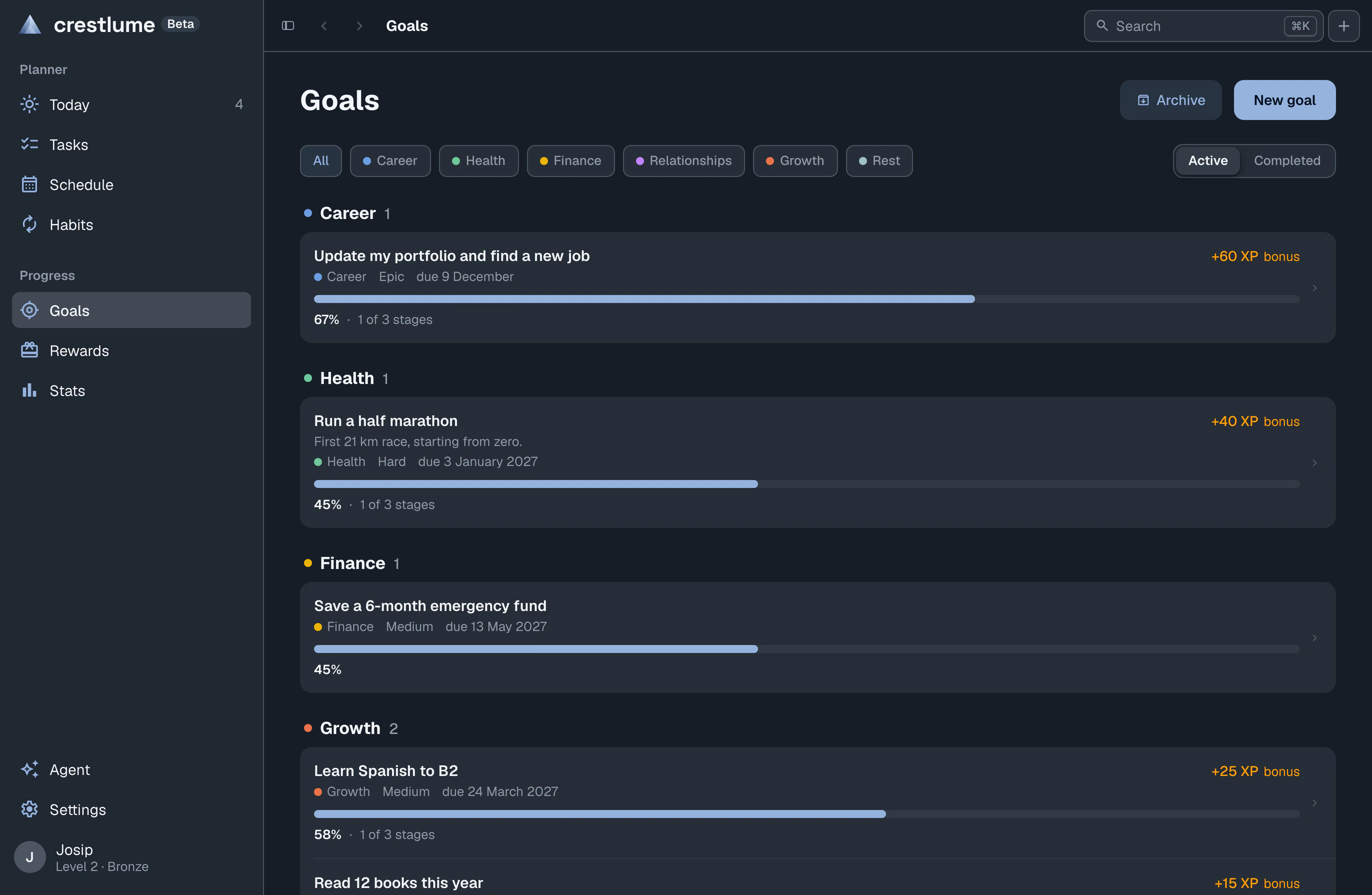
  • Tasks roll up into goals, goals show real progress
  • Daily quests, achievements and a stats screen to look back on
Goals screen with progress bars
02 · Everywhere, and private

On every screen you use. Readable only by you.

One app in the browser, on your Mac, Windows or Linux desktop, and on Android. It works fully offline. Turn on sync and every item is encrypted on your device before it is uploaded. With Extra privacy on, only your passphrase can unlock it, not even we can.

  • No account needed to start, everything stays on your device
  • Desktop and Android databases encrypted at rest
  • Export and import your data as JSON at any time
WebAny browser
DesktopMac · Windows · Linux
AndroidAPK
Encrypted sync, your choice of keys. Data is encrypted before it leaves your device. Turn on Extra privacy and only your passphrase unlocks it. Sync is opt-in, the app is complete without it.
Today on a phone Tasks on a phone Agent on a phone: logging a finished task and redeeming a reward
03 · An assistant that does the clicking

Tell it what you need. It plans, creates and checks off.

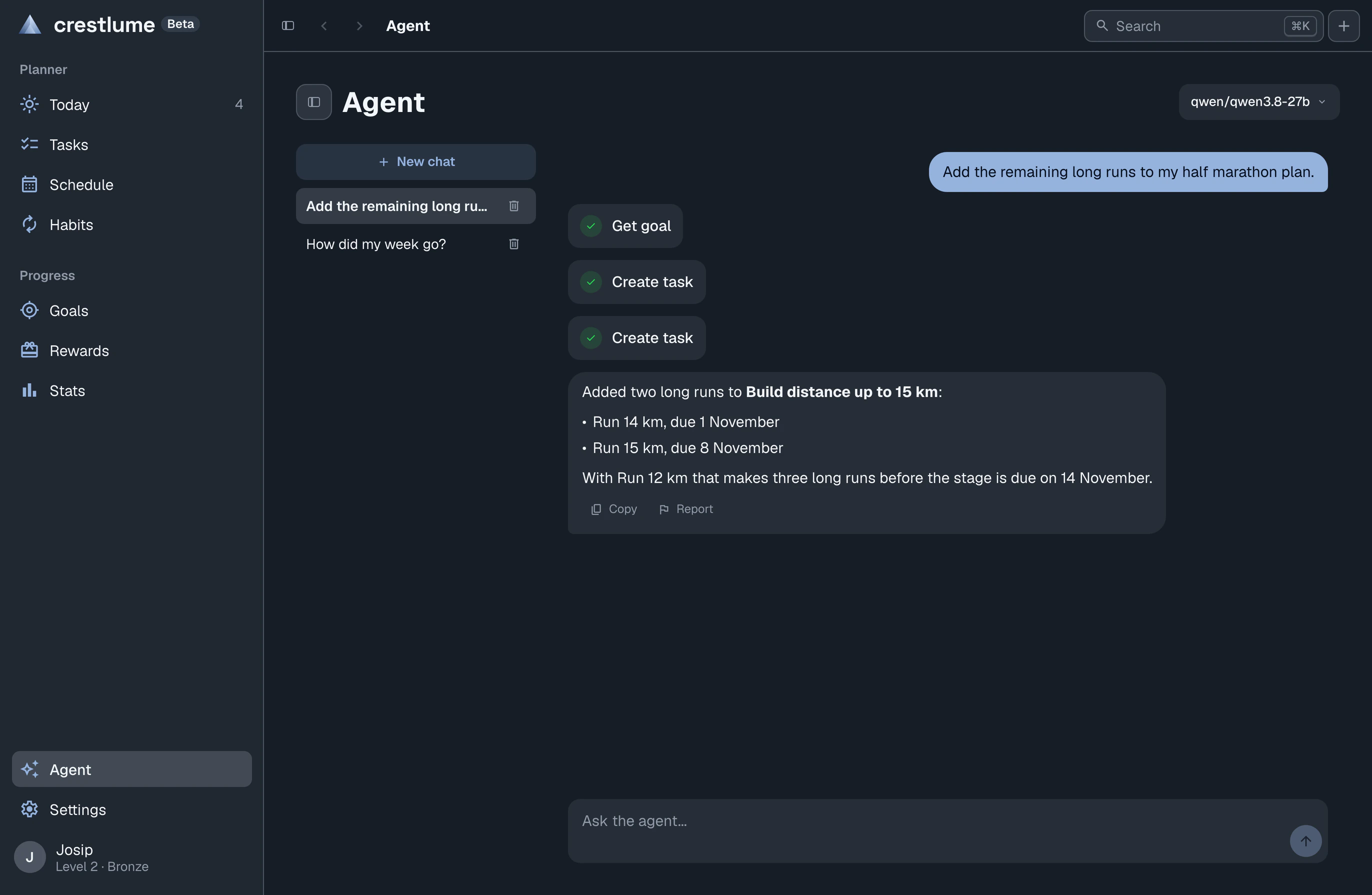
The Agent tab is a chat assistant that can read your tasks, goals and habits and make the same changes you would make by hand. "Break this goal into tasks for next week" just happens.

  • Bring your own OpenRouter key, pick any model
  • Chats are stored only on your device and never synced
  • Completely optional, the app works the same without it
Agent chat adding two long runs to a stage of the half-marathon goal
Questions

Frequently asked

Is crestlume free?

Yes. crestlume is in public beta and everything is free. A paid Pro plan is planned for later, and regular sync between your devices will stay free for everyone.

Do I need an account?

No. You can use crestlume without signing up, and your data stays on your device. An account is only needed if you want to sync between devices.

Does it work offline?

Yes. crestlume is local-first: tasks, goals, habits and rewards live on your device and the app works fully without an internet connection.

How private is my data?

When you sync, every item is encrypted on your device before it is uploaded. Turn on Extra privacy and only your passphrase can unlock it. There are no ads, no analytics in the app, and we do not sell your data. The Privacy Policy explains both sync modes in detail.

Which platforms does it run on?

In any modern browser, on macOS, Windows and Linux, and on Android. On iPhone and iPad, use the web app.

What does the AI agent do?

It is an optional chat assistant that reads your tasks, goals and habits and makes changes for you, like breaking a goal into tasks for next week. During the beta it uses your own OpenRouter key, and chats are stored only on your device.

Does it work with Google Calendar?

Yes, in the desktop and Android apps, and only if you connect it in Settings. crestlume then shows the events of the calendars you pick as blocks in your schedule, writes the blocks you add, move or delete back to that calendar, and can create a new calendar for you. Your Google access stays on your device and you can disconnect at any time. The Privacy Policy lists exactly what it reads and writes.

Start your first quest today.

Free. Open it in the browser in a second, or install it where you spend your day.

Betacrestlume is in public beta. Everything is free for now. Paid subscriptions will come later, and regular sync between your devices will stay free.

The desktop and Android apps are not verified by Apple, Microsoft and Google yet, so on first install your system may warn you or ask for an extra permission:

  • macOSDrag crestlume to Applications. If macOS says the developer cannot be verified, open System Settings, Privacy & Security and click Open Anyway.
  • WindowsIf SmartScreen says "Windows protected your PC", click More info, then Run anyway.
  • AndroidAllow your browser or file manager to install unknown apps when Android asks, then install.
  • LinuxMake the file executable (chmod +x crestlume-linux.AppImage), then run it.